
Let’s walk through the extensive, time-saving features packed into Work Scheduler. We’ll split it into sections :
- Clients (if you’re scheduling workers within a single business you might prefer to think of these as Tasks or Roles)
- Staff
- Scheduling
- Mobile Work Tracking
- Invoicing
- Customisation
Clients
For each client you can record the following
- standard name and address information
- multiple phone numbers and email addresses
- job description (this is available to your staff on their mobile login)
- private information (only accessible to Admin staff)
- client Requirements – These can be daily, fortnightly, 3 weekly, etc and you have as many as you like per client
Therefore if a client requires one of your staff every Monday, Wednesday and Friday plus a visit from a different member of staff every alternate Thursday then that’s no problem ! - Charge rate and payment info
- Specialist Info – eg site access codes.
- Diary – record notes from conversations with your client

Staff
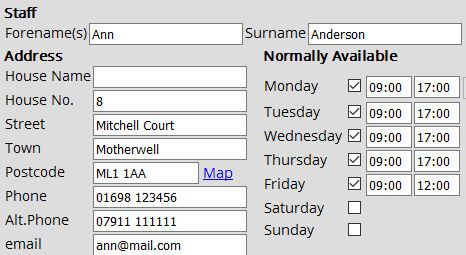 For each staff member you can record the following
- standard name and address information
- email address and landline + mobile phone numbers
- normal availability on a day-to-day basis
- unavailable periods such as holidays, sickness
- diary – record notes from conversations with your staff member
Scheduling
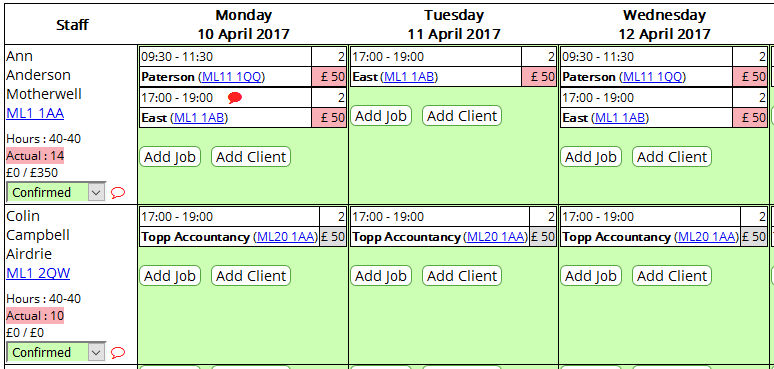 Staff schedules are displayed week by week on a spreadsheet style grid which can easily be searched and filtered
You can create schedules for as many weeks going forward as you wish and review previous weeks.
Within the Schedule Screen you can
- edit jobs and move them to different days and times
- change the staff member assigned to the job
- make notes
- edit payment information
- add new ad-hoc jobs
- delete cancelled jobs
Mobile Work Tracking
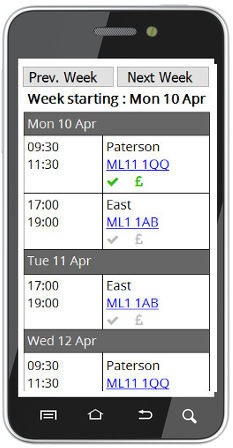 Your staff can all have individual logons that allow them to view their current week’s schedule and also view a configurable number of weeks forwards and backwards
- their summary screen shows that weeks jobs and their status
- each job has a detail screen with the job’s description and any notes for the worker
- they can mark each job as complete as it’s done
- if the job requires payment to be collected this is shown to them and they can mark it paid.
- this information is automatically displayed on the main Admin scheduling screen.
- the same job tracking information can be entered be admin staff on their screens if that’s how you prefer to work.
Invoicing
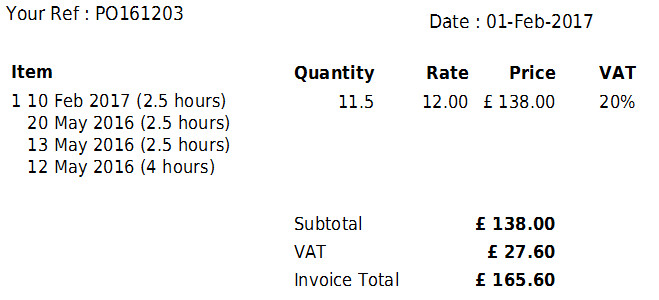 Invoices can be created automatically in batches or individually.
Work Scheduler stores all your weekly schedules and tracks completed jobs so at any point, weekly or monthly, it knows what work is billable for each client and can automatically create detailed line items.
Invoices can be reviewed before sending (as PDF) and have extra items (eg materials) added if required.
Customisation
We like to make you feel at home when using Work Scheduler so there are over 40 configuration parameters you can adjust, including
- Colours
- Logo
- Terminology
- Your Business Information
- Password complexity